Showing posts with label make robots. Show all posts

Sunday, June 19, 2011

BuLo now in retail shops!!


The wait is finally over. week, BuLo launched its popular robotics kit , Robotronics LITE in a retail shop at Gurgaon!!
To know more about our retail partners, visit www.bulo.in.

Saturday, June 04, 2011

Summer Camps for Kids at Noida and Gurgaon


After great response from our Batch 1 Summer Camp, Bulo is launching the Batch 2 for the MARS Mission Robotics Summer Camp at our centers.

Noida
Dates: 13th - 17th June
Time: 9 am - 11.30 am
Venue: Prakriti Activity Center, F 72/A, Sec-22, Noida, UP
Workshop Theme: MARS Mission Robotics Summer Camp Level 1 and Level 2

Gurgaon
Dates: 13th - 17th June
Time: 9 am - 11.30 am
Venue: Stones2Milestones, G-124, Oriental Villa, Sushant Lok 3, Sector 57, Gurgaon
Workshop Theme: MARS Mission Robotics Summer Camp Level 1 and Level 2

Saturday, May 28, 2011

Weekly Robot - Imperium , the Mega Lifter


Name of Robot : Imperium the Mega Lifter

Type: Lifting Robot

Features :
1. Hook Lift - 2 ranges
2. Fork Lift
3. Fork Push
4. 4 Wheel Motion Drive

Function : 'Imperium' means powerful in Latin. This robot has a really high torque value and can lift loads of upto 7-9 kg's.

To learn more about this robot, visit www.bulo.in

Saturday, May 21, 2011

Weekly Robot - 2D Crane - Robotronics Lite


Name of Robot: 2 D Crane
Type of Robot: Remote operated
Features:
  1. Ability to move in linear motion
  2. Pick up arm with hook
  3. Pick arm on rotating base
Application: In Industries to transport boxes or bags


Saturday, April 23, 2011

Robomania in TOI

Robomania was listed on the Summer Workshop page on Times of India....

Monday, November 22, 2010

Screw Driver Mysteries.....

Tightening screws can be bugging at times. You keep rotating the screw driver and the screw refuses to tighten!!


With the Screw Driver Mysteries solved, you can actually get the task done in a few seconds rather than minutes. I have listed a few for you:

1. Right Direction : All screws tighten in the clockwise direction and loosen in the anti-clockwise direction.

2. Right Tip: The tip of the screw driver should be almost equal to the size of the screw's head. This makes sure all the force you apply is directed at the right place.

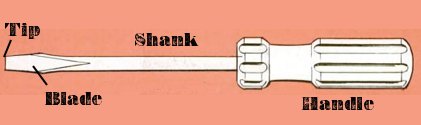
3. Right Size: Choose your screw driver depending on how much power you require. For more power, use one with a short shank (the part between the tip and the handle) .

If you have resolved any more Mysteries, feel free to share them!

Sunday, September 05, 2010

Magical Torque......

In the post At the Right Angle, I talked about the definition of force and its application in Robotic Arm and Base. In today's post, I will talk about how Torque can create magic!!

We need to apply a bit of mathematics here to understand the magic.

Torque is calculated by the formula:
T = F*d

T is the torque
F is the force applied perpendicular (at 90 deg.) to the axis
d is the distance

By using the above formula, we can calculate torque for Geared systems. Lets, take the example of the gear system below:


Here, we have attached a gear system with a pulley. Let us assume the load on the pulley is 1 kg and the diameter of the pulley is 1 inch. Then the torque would be:

T= F* d = 1 kg * 1 inch = 1 kg-inch

Now, what would be the torque on the Big Gear? The torque transferred on the Big Gear would also be 1kg-inch. This is because the torque remains constant on the shaft, and is transferred to the big gear.

The next step is to calculate the force on contact point B. We know the Torque is 1 kg-inch and the diameter of the Big Gear 1 inch. So,

F = T/d = 1 kg-inch * 1 inch = 1 kg

So now lets calculate the torque on the motor. The force on the Small Gear is 1 kg and its diameter is 1/4 inch. The resultant torque on the motor shaft is:

T= F * d = 1 kg * 1/4 inch = 1/4 kg-inch

Did you see the magic happen?
Torque at motor = 1/4 kg - inch
Torque at Pulley = 1 kg- inch!!

Torque increases magically, but only if we put the gear systems right!

Sunday, August 29, 2010

Innovation is Here!

Hi Friends,

Here is an innovative robot designed by Sahil Rastogi (RDPS). This is a Robotic Claw that can grip objects.


If you have some interesting designs to show to us, mail us at bulo@buildingblocks.in with your name, school and age.

Sunday, August 22, 2010

The Powerful Trio

Okay, so your robotic arm does not pick heavy objects and you cant keep adding Gear Systems (there are really expensive!). So what do you do?

Maybe, you should use the Powerful Trio - Force, Surface Area and Pressure into use. Let me first give you the definitions of the three concepts:

Surface Area: A mathematical term that tells us how much surface is exposed
Force: Any external influence that makes an object move.
Pressure: Force applied per unit area.

Using all three, you can spread the force to an area. Lets take an example of this object lifter:


This lifter has a cool gear system. But notice the Arm is attached through the small axle. It has a small area of contact on the Long L Clip.

Less the surface area, more is the net pressure on the area of contact. And the resultant force on the shaft of the motor makes it difficult to pick objects.

Here's the solution. Design the robot in such a way so that the pressure is distributed to different contact points.


This Object Lifter can lift greater load as we now have two points of contact where pressure is well distributed.

The Powerful Trio definitely makes your robot more powerful!!

Wednesday, August 18, 2010

At the Right Angle

What is Torque?

Torque is a force that tends to rotate objects. Any rotating body has three parts:

1. Origin of axis: The point around which the body rotates.

2. Distance of arm : The origin and the point at which force is applied

3. Angle of force: The angle between the arm and force applied.

The angle of force is very crucial. Any force directed parallel to the particle’s position vector does not produce torque.

Torque is applied in various parts of the robot:

1. The robot base:

If you require the robot base to move, we need to turn the robot. The torque at the base depends on the force applied by the motor. Force is a function of mass and acceleration. Hence both speed of the motor and weight of the robot matter in the robot base.

2. The robot arm:

The concept of torque is important in a robot arm. Here torque is generally applied on the shaft of the motor. We can increase the torque in the arm using Gear Systems. The application of gear systems is given in another document.

So next time you design a robot, remember to keep the angle right!!

Tuesday, July 20, 2010

Robotronics Lite - New Design!!!

Hi friends!
Here is a new design created with the BuLo Robotronics Lite robotics kit.

This robot is called a Fork Lifter. The task of this robot is to pick up boxes.
You can also share your Robtoronics Lite designs with us! Maybe we can feature your model at our blog!!